One screen. Tap the product, search for it, or scan it. Tap the account the money went into, such as CASH, VODA LIPA or NMB, and the sale is recorded there. There is nothing to check at closing time.
Create your account Set-up guides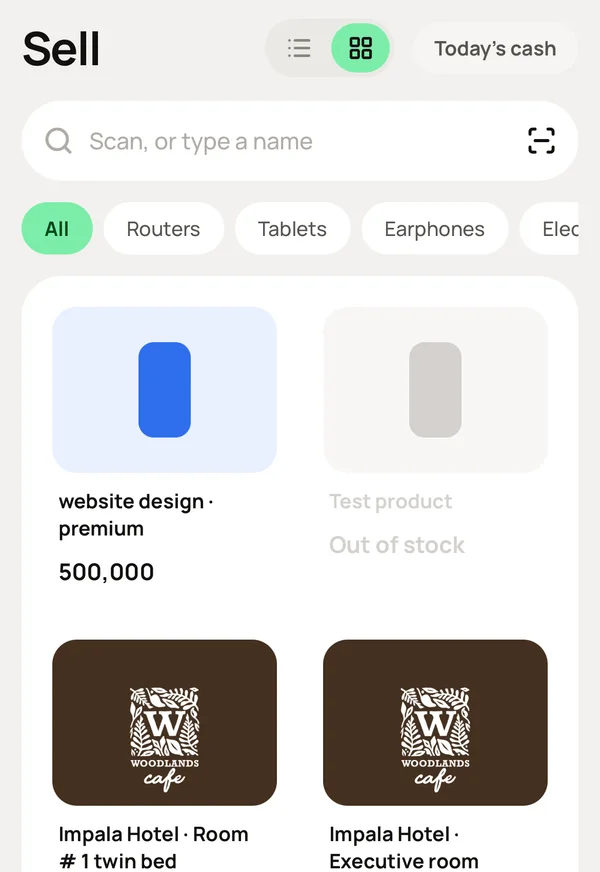
What you do, and what Meku does with it.
At the home page, tap New Sale, then tap the product. Tap again for two, or scan its barcode.
Lists your products with the best sellers at the top, so the usual sale takes one or two taps.
Under DIRECT TO ACCOUNTS, tap the account the money went into: CASH, your Lipa namba or the bank.
Records the sale in that account. There is nothing to check at closing time.
Tap Charge.
Prints the receipt or sends it to the customer's phone, takes the stock off the shelf, and changes the account balance, all at the same moment.
Nothing.
Shows today's sales on Home, the new balance on Account, the stock on Inventory, and the sale itself under Transactions. You typed it once.
Did you make a mistake? Open the sale under Transactions and cancel it.
Returns the stock and the balance, and keeps the cancellation on record with the name of the staff who did it.
No. Any Android phone, iPhone or computer is the POS. If you have a thermal printer, receipts print on it. If you do not, they are sent to the customer's phone.
No. The day starts with your first sale and closes automatically at midnight. You can count each cash box when you want to.
Yes. A haircut, a consultation or a repair is sold like any other item. Give it a price and set how many you have to 999, so it never finishes.
Simple to use. Works on the web, iPhone and Android.
