Many customers buy on credit, and Meku is built for it. Select Credit at the POS, choose the customer, and the debt is recorded: who owes, how much, and since when. Reminders are sent by SMS for you.
Create your account Set-up guides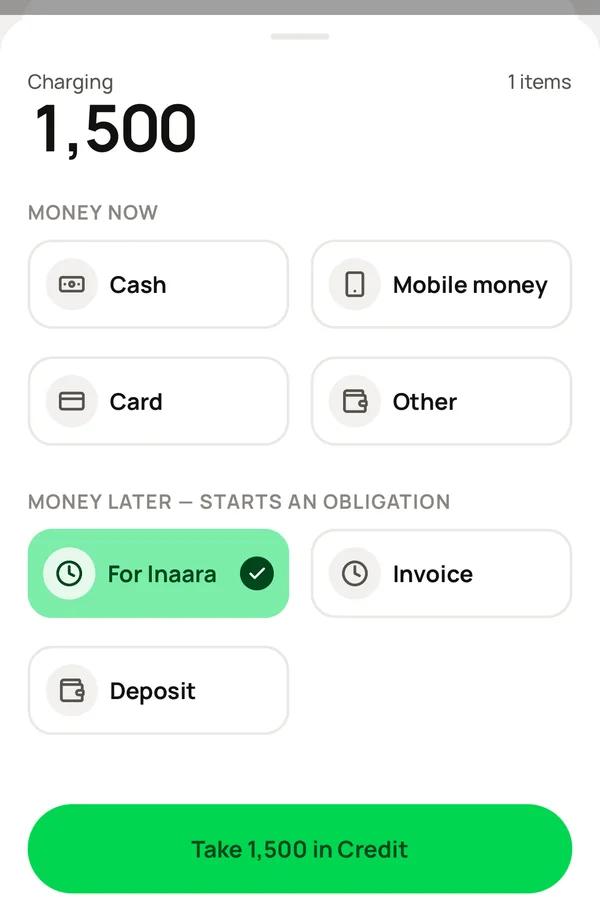
What you do, and what Meku does with it.
At the POS, select Credit under PAYMENT LATER. Choose the customer, or create them with a name and a phone, and tap Charge.
Records the sale, adds the customer to Contacts if they are new, and keeps the debt under Debts → Credit with the date. The oldest is first, so the customer who has owed you longest is always at the top.
Nothing.
Sends the customer an SMS reminder from your business, on a schedule you do not have to manage. You are never the one who has to ask.
Open the debt under Debts and record a full or part payment, and the account it went into.
Updates the balance and the account, and keeps every payment on the customer's record.
If it will never be paid, write it off once.
Records the loss correctly in your records, instead of leaving it as money you do not really have.
Meku does, by SMS, from your business name, on a schedule. You do not have to manage it.
It counts as a sale, because you earned it, but not as cash in an account until the customer pays. Home shows both, so the two figures never surprise you at closing time.
Yes. Their card under Contacts shows every purchase, every debt and every payment.
Simple to use. Works on the web, iPhone and Android.
