Choose the customer, add the items and send. The customer receives the invoice as a PDF with your business details on it, and it stays under Debts until it is paid, by mobile money that you mark, or by a bank transfer that they send proof of.
Create your account Set-up guides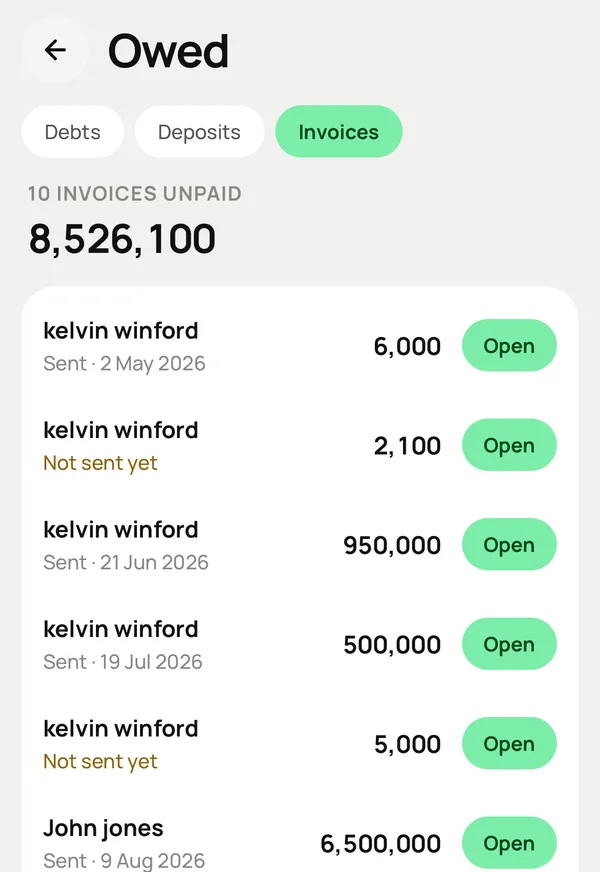
What you do, and what Meku does with it.
At the POS, select Invoice under PAYMENT LATER and choose the customer. They need an email address to receive it. Tap Charge.
Sends a PDF to the customer's email with your business name, phone and the items on it. The sale is recorded, but no account changes, because no money has arrived yet.
Nothing.
Keeps it under Debts → Invoices with every other invoice that is sent and not yet paid, oldest first. It also shows whether it was ever sent, because a contact with no email cannot receive one.
When they pay, mark it as paid and choose the account the money entered. If they paid by bank transfer, they can attach the proof and you confirm it.
Puts the money into that account, removes the invoice from Debts, and keeps the proof with it.
Yes. Open it and print. It is sent by email as a PDF first, so the customer already has it.
No. It is a PDF sent by email.
Mostly, yes. Send the invoice, get paid into the correct account, and see what is not yet paid. Your profit and your statements come from that.
Simple to use. Works on the web, iPhone and Android.
