A room, a tour, a seat, a car or an appointment is sold by the date, not from a shelf. Meku keeps the calendar, refuses a date that is already taken, and follows the first payment until the guest arrives.
Create your account Set-up guides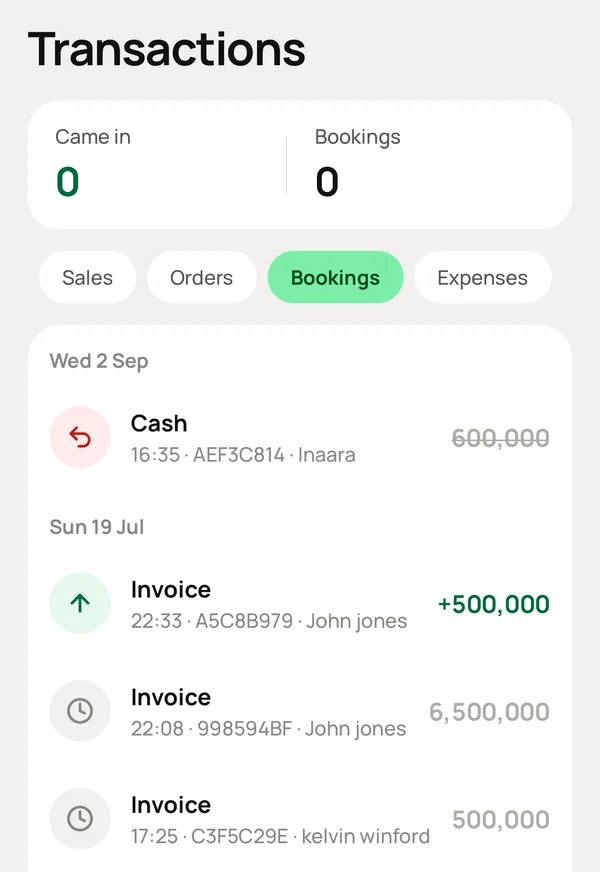
What you do, and what Meku does with it.
Settings → What you sell: turn on Bookings. If you said Yes when you signed up, it is already on for a guest house, a tour company or a salon.
Makes every sale ask for a date.
Inventory → Add: a room type or a trip, its price, and how many you have for each day, such as rooms of that type or seats on that trip.
Turns that number into a calendar that shows how many are free on every date.
Tap New Sale, tap the room or the trip, and choose the dates.
Checks the calendar first. If a date is full, it tells you before you promise it.
Take a first payment into one of your accounts, or the full amount.
Records the payment in that account, and keeps the rest under Debts until the guest pays it.
Open Transactions → Bookings.
Lists every stay and trip with the guest's name and phone, so you can call them or send a WhatsApp message from there.
Yes. Set how many you have for each day. Three double rooms means three places, and Meku sells up to that number for each night.
Cancel the booking under Transactions. The dates become free again, and any payment is on record, to refund or to keep.
Simple to use. Works on the web, iPhone and Android.
