Reports → Profit: what you sold, less what you bought, less what you spent, shown as a calculation you can follow, for today, this month, this year, or any two dates. Below it, what really earns.
Create your account Set-up guides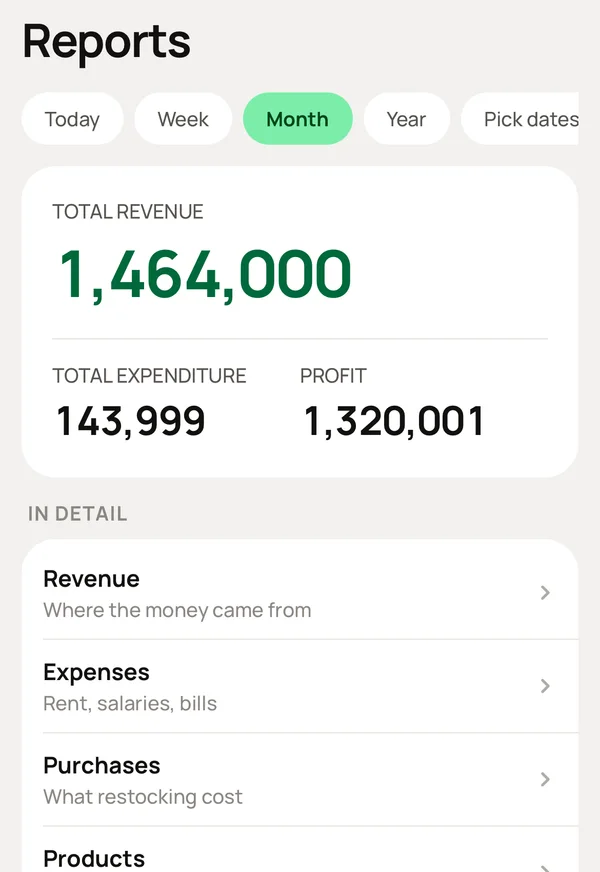
What you do, and what Meku does with it.
Reports → Profit. Choose today, this month, this year, or any two dates.
Shows sales at the top, takes off what you bought and what you spent, and shows profit at the bottom.
Tap Revenue.
Shows sales by product, by category and by day: which of your things earn, and when.
Tap Expenses, or Purchases.
Shows expenses by category, and purchases by supplier. Stock is under Purchases, not Expenses. The report says so, so you do not look in the wrong place.
Tap Stock value.
The one report with no period: what is on the shelf and what it is worth, right now.
Tap Products.
Shows what sells, what earns and what is not selling, so you decide prices and stock from numbers.
Reports counts what you earned. A credit sale counts on the day the goods left. Account counts money that actually arrived. Both are correct, and each page says which it shows.
No. Reports is for the owner.
Simple to use. Works on the web, iPhone and Android.
